1/12/2011

How to generate google sitemap.xml manually in magento

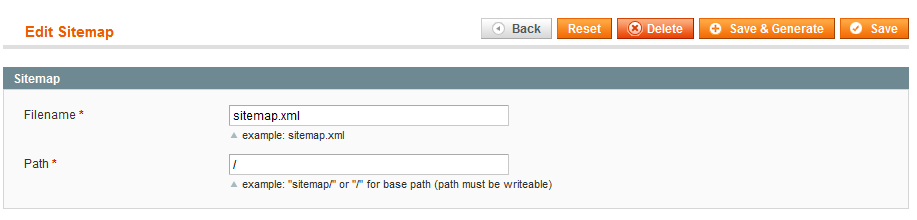
To generate Sitemap.xml in magneto ,Login to your admin panel of your site. Then goto Catalog -> Google Sitemap. Click on Add sitemap then give sitemap.xml in the field of Filename then in the field of Path give your path foldername ( If you wish to save the sitempa.xml in your root folder then use " / " sign). Then click on Save&Generate button to generate your sitemp.xml . then type www.yoursite.com/sitemap.xml to see your sitemap(If you have not use any folder).Submit this sitemap to Google or Bing to see your site in search engines.
1/06/2011

how to remove .html from category and product url in magento

By Default magento's all category url and product url comes with .html extension.If you want to remove the .html extension from all category url and product url, then Follow the below step.

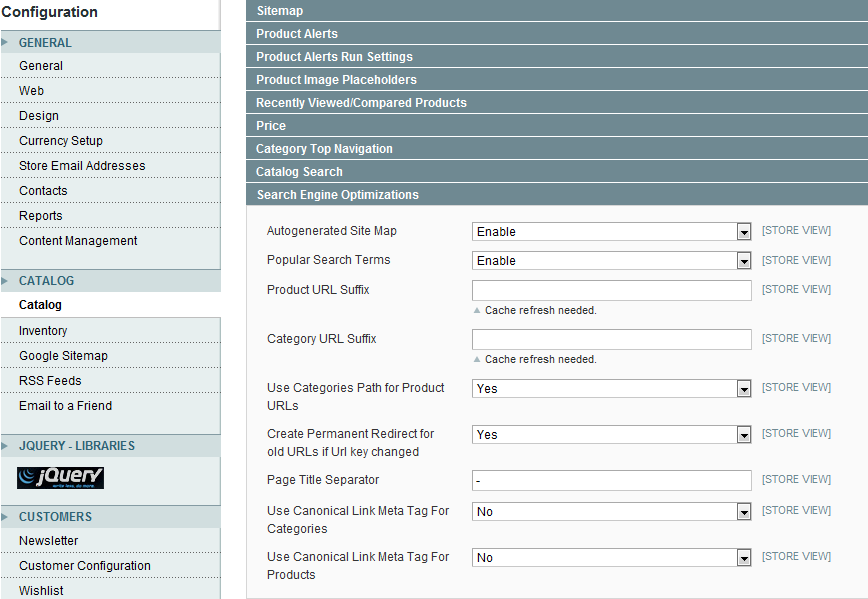
Login to your magento admin panel then Go to System->Config ->Catalog. From Search Engine Optimizations tab delete ".html" from Product URL Suffix and Category URL Suffix, and save config. Now goto System->Index Management and Reindex All data. Now clear your cache. You can see that all .html has been removed.

1/05/2011

How to get sub category list of a particular category in magento

To get all subcategory list under a particular category you need to know the category id of that particular id, then you can get the subcategory .In the below example I have taken My category id is 69.

<?php
$category = Mage::getModel('catalog/category')->getCategories(69);
foreach($category as $_category){
$currentCat = Mage::getModel('catalog/category')->load($_category->getId());
?>
<li><a href="<?php echo $currentCat->getUrl()?>"><?php echo $currentCat->getName();?></a></li>
<?php
}
?>

How to get all Sub-category list by a main category Id in magento

How to see all category and subcategory menu in Magento

By default there is a top.phtml file in magento which show all category and subcategory .To modify menu display style it needs to modify in core file whcih will create problem to Update magento in future,So without touching the core file we can access all category and subcategory in magento.
For that we will write the code in top.phtml file

<?php foreach ($this->getStoreCategories() as $_category): ?>
<li>
<a href="<?php echo $this->getCategoryUrl($_category) ?>"><?php echo $this->htmlEscape($_category->getName()) ?></a>
<?php
$_catid=$_category->getId();
$category = Mage::getModel('catalog/category')->load($_catid);
$subcategory = $category->getAllChildren(true);
array_shift($subcategory);
if($subcategory!=null)
{?>
<ul>
<?php
foreach ($subcategory as $sub)
{
$sub1 = Mage::getModel('catalog/category')->load( $sub);
?>
<li><a href="<?php echo $sub1->getUrl();?>"><span>
<?php echo $sub1->getName(); ?>
</span></a></li>
<?php } ?>

</ul>
<?php }?>

</li>
<?php endforeach ?>

1/03/2011

How to get Current currency code or symbol in magento

To get Current currecy code in magento, write the following code.

<?php echo $current_currency_code = Mage::app()->getStore()->getCurrentCurrencyCode(); ?>

To get Current currecy symbol in magento , write the following code.

<?php echo $current_currency_symbol = Mage::app()->getLocale()->currency(Mage::app()->getStore()->getCurrentCurrencyCode())->getSymbol();?>

12/28/2010

how to get all products in magento

To get All products in magento Store not from a particular category or to get all products from default store in magento ,write the following code

<?php
Mage::getModel('catalog/product')->getCollection()->getData();
?>

12/16/2010

Search is not working in magento after Import product

I use Icecat module to Import data and near about 10,000 product I upload to my site,After uploading all product when I searched some product ,it didn't display any result, but when clicking on category showing that product. Then I just login to admin section of my site then goto -> System -> Index management. There I clicked on Catalog Search Index and Reindex data.Clear my Cache and It worked .

12/13/2010

How to Add Customer Group field while register in magento

It's default magento Features.You need to Edit 2 file. one is config.xml which resides in app/code/core/Mage/customer/etc/config.xml and other is Register.phtml which resides app/design/frontend/your_interface/Your_theme/template/customer/form/Register.phtml

Open Config.xml then goto line number near about 82 there add <group_id><create>1</create><update>1</update></group_id> under
<fieldsets>
<customer_account>

The code will be something like this

<fieldsets>
<customer_account>
<group_id><create>1</create><update>1</update></group_id>
</customer_account>
</fieldsets>

Now go to register.phtml and write the following code under the section where you wanrt to put.

<li>
<label for="customer_groups" class="required"><em>*</em><?php echo $this->__('Customer Groups') ?></label>
<select name="customer_groups" id="customer_groups" title="<?php echo $this->__('Customer Groups') ?>" class="validate-group required-entry input-text">
<?php $cu_groups = Mage::helper('customer')->getGroups()->toOptionArray(); ?>
<?php foreach($cu_groups as $cuGroups){ ?>
<option value="<?php echo $cuGroups['value'] ?>"><?php echo $cuGroups['label'] ?></option>
<?php } ?>
</select>
</li>

How to get all products from a particular category id in magento

While i was working on magento ,I had one requirement that how to get all product under a particular category id.I got the id of that particular category.Now I wrote the following code to get all product under that category id.

My category id is

<?php $catid=10 ;?>

I go all product by writing the below code

<?php
$category = new Mage_Catalog_Model_Category();
$category->load($catid); //My cat id is 10
$prodCollection = $category->getProductCollection();
foreach ($prodCollection as $product) {
$prdIds[] = $product->getId(); ///Store all th eproduct id in $prdIds array
}?>

Now you have all the product ids in $prdIds variable. Just click here to get all details of the product from a particular product id.You can get individual product id by the following loop.

<?php foreach($prdIds as $_prdIds){
$prodId=$_prdIds;
// In each loop one by one product id will be assign in between this loop Fetch all data of the particular product id.To get this click here
}?>

12/10/2010

How to show/hide template path hints of admin panel/backend in magento

To show template path hints in admin panel of magento you need to login to your phpmyadmin then run the following sql command

INSERT INTO core_config_data (scope, scope_id, path, value)
VALUES ('default', 0, 'dev/debug/template_hints', 1),
('default', 0, 'dev/debug/template_hints_blocks', 1)

To hide template path hints of admin panel or backed just run the top code by changing 1 to 0, then the template path hints will be hide.
You also can run the following sql command to hide template path hints.

INSERT INTO core_config_data (scope, scope_id, path, value)
VALUES ('default', 0, 'dev/debug/template_hints', 0),
('default', 0, 'dev/debug/template_hints_blocks', 0)

If you have already activated template path hints in admin panel or if you already run the top sql command once then No need to run this code again.Just go to core_config_data table of your php myadmin then change the value of `dev/debug/template_hints` rows to 0 or 1 to show or hide