9/14/2010

change My Cart text in magento

To Chnage the text of My Cart in top links you need to go app/code/core/Mage/Checkout/Block/ there you will find Links.php .there will be below function


public function addCartLink()
{
if ($parentBlock = $this->getParentBlock()) {
$count = $this->helper(’checkout/cart’)->getSummaryCount();

if( $count == 1 ) {
$text = $this->__(’My Cart (%s item)’, $count);
} elseif( $count > 0 ) {
$text = $this->__(’My Cart (%s items)’, $count);
} else {
$text = $this->__(’My Cart’);
}

$parentBlock->addLink($text, ‘checkout/cart’, $text, true, array(), 50, null, ‘class="top-link-cart"’);
}
return $this;
}

Change “My Cart” to your required text and Upload it to server.then clear the catche to see the effect

9/06/2010

how to change theme in magento

To change theme of Magento you need to login to your admin panel.There is two way to change it
1) Go to System->Design .Click on Add Design Change ,there from Custom Design click on the DropDown to select your Design , then save it to change your theme
Change theme in Magento

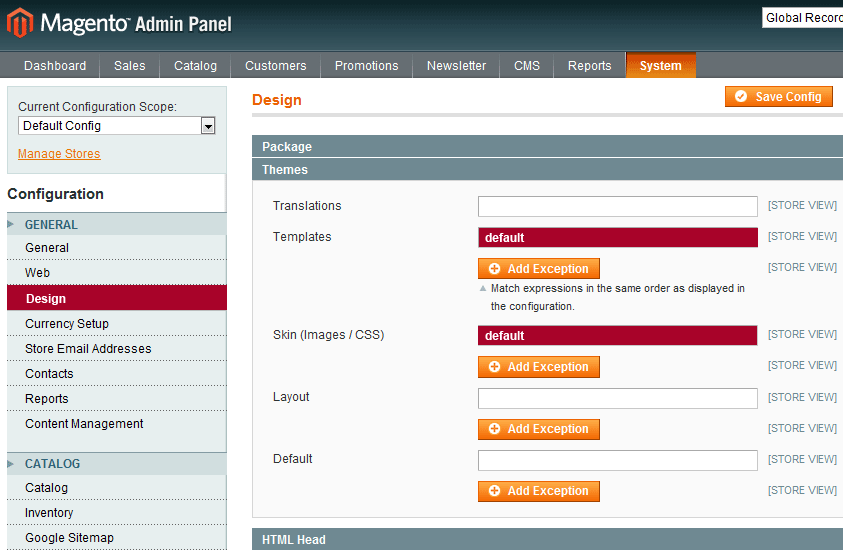
2) Go to System->Configuration then click on Design,there from Themes Tab you can change your theme.Write your theme name in Templates and Skin (Images / CSS) Field. then click on save Config to save your theme.

Change theme in Magento

If you don't know you theme name then it is beter to choose First option,Because it is much easier than the second one.One more thing that if you have two store and you want to make 2 different Theme for that two store than you have to follow the first process.

difference between append() and html() in jquery

.aapend() and .html() is the most usefull method in jQuery.But these are far different from one another, .append() add some value with the existing one.whether .html() do the same but it removes the old value
Here is an example is given

<ul id="test">
<li>test</li>
</ul>

Now I will use .append() to add one <li>, For that I will write
<script type="text/javascript>"
jQuery("#test").append("<li>test1</li>");
</script>


The output of this jQuery will be
<ul id="test">
<li>test</li>
<li>test1</li>
</ul>

Now if I use .html() to add one <li>, For that I will write
<script type="text/javascript>"
jQuery("#test").html("<li>test1</li>");
</script>

The output of this Script will be
<ul id="test">
<li>test1</li>
</ul>

Here in this example .append() add one extra <li>, whether .html() removes the old one with new one. This is the main difference between .append() and .html() in Jquery

hide subcategory menu in magento

There is two way to hide subcategory menu.One is from admin panel and other is by css.


1) From Admin Panel :-
Login to admin panel of your magento site then go to System->Configuration. from the left hand side panel click on Catalog, then click on Category Top Navigation tab.Default the value written in the Maximal Depth is 0 , make it 1 to hide the submenu.


Hide Subcategory Menu

2) From Css :-
go to your ...

9/01/2010

Magento connect manager internal server error

This is the most common problem for all Magento User.This problem is only for the File Permission in the server.To solve this Problem first you need to login to your FTP(File Transfer Protocol), then go to your magento installation path their you will find downloader Change the file permission to 755 , Again goto the index.php file inside downloader folder and change the file permission to 755.Now refresh the page you will see the effect.

8/30/2010

How to get all Store Ids in Magento

<?php
$allStores = Mage::app()->getStores();
foreach ($allStores as $_eachStoreId => $val)
{
$_storeCode = Mage::app()->getStore($_eachStoreId)->getCode();
$_storeName = Mage::app()->getStore($_eachStoreId)->getName();
$_storeId = Mage::app()->getStore($_eachStoreId)->getId();
echo $_storeId;
echo $_storeCode;
echo $_storeName;
}
?>

8/28/2010

Change default Home page url to any page url in Magento

To change default index page of magento any cms page or any page like login page is quite easy .To do so you need to login to the admin panel then goto System -> Configuration , then click on web tab from the right side tab.Now click on Default Pages tab and change the Default web url as per your required Url.Here is one example where I have changed my Homepage url to Login page Url


Change default Home page url to any page url in Magento

8/26/2010

How to find third highest salary from a database table by sql or mysql

By this query you can find all possible(nth) highest salary starting from 2nd to nth.Just palace your find number salary in the place of `n` and you can get result. Here I have wrote the `n`th highest salary.


Select salary
from `tablename`
order by `columnname` desc
limit n-1,1;

Write 2 instead of n-1 to find the 3rd highest salary.Write 1 instead of n-1 to find the 2nd Highest salary.

How to Count all li elements in an ul tag by javascript

<script type="text/javascript">
var ulId = document.getElementById("ulid");
var totalLi = ulId.children.length;
alert(totalLi);
</script>

The list of the li in ul tag example is


<ul id="ulid">
<li>Item1</li>
<li>Item2</li>
<li>Item3</li>
<li>Item4</li>
</ul>

How to get parent category Id in Magento

To get Parent Category Id you must know the current category Id, for that you need to write
<?php
$_cat = new Mage_Catalog_Block_Navigation();
$curent_cat = $_cat->getCurrentCategory();
$curent_cat_id = $curent_cat->getId();?>

Now you can get Parent Category Id.
write the code given below to get the Id
<?php $parentId=Mage::getModel('catalog/category')->load($curent_cat_id)->getParentId();
echo $parentId; // $parentId will print your current category's parent Id
?>