9/27/2011

How to delete all sales order in magento

In Magento Connect you will find some extension which will delete all cancel order and Pending Order, But it never delete all processed order. To delete all orders following code snippet can be used.

<?php
require 'app/Mage.php';
Mage::app('admin')->setUseSessionInUrl(false);                                                                              
$sales_orders = Mage::getModel('sales/order')->getCollection()->getData();
foreach($sales_orders as $sales_order){
    $id = 0;
    $id = $sales_order['increment_id'];
    try{
        Mage::getModel('sales/order')->loadByIncrementId($id)->delete();
        echo "order #".$id." is removed".PHP_EOL;
    }catch(Exception $e){
        echo "order #".$id." could not be remvoved: ".$e->getMessage().PHP_EOL;
    }
}
echo "complete."
?>
9/26/2011

How to use or mysql condition in $collection data of magento

Magento provide  addAttributeToFilter to use and operator in $collection, But using of OR operator is little bit different . I was guess that there must be and OrAttributeToFilter , But I was wrong I think magento forgot to write this function, Lastly I found the solution to use mysql OR in magento . In addAttributeToFilter we have to write the condition in the form of array.
protected function _prepareCollection()
{
   $collection = Mage::getModel('catalog/product')->getCollection();
   $collection->addAttributeToFilter(
      array(
          array('attribute'=>'category_ids','finset'=>2),
          array('attribute'=>'category_ids','finset'=>3)
      )
   );
}


use your own attribute name and value to get the data

9/16/2011

How to upload and read csv file in magento

To upload CSV file and to read that file line by line , Please write the below code in magento

if(isset($_FILES['import_file']['name']) && $_FILES['import_file']['name'] != '')
{
    $uploaderFile = new Varien_File_Uploader('import_file');
    $uploaderFile->setAllowedExtensions(array());
    $uploaderFile->setAllowRenameFiles(false);
    $uploaderFile->setFilesDispersion(false);
    $uploaderFilepath = Mage::getBaseDir('media') . DS . 'importcsv' . DS ;
    $uploaderFile->save($uploaderFilepath, $_FILES['import_file']['name'] );
    $file = $_FILES['import_file']['name'];
    $filepath = $uploaderFilepath.$file;
    $i = 0;
    if(($handle = fopen("$filepath", "r")) !== FALSE) {
        while(($data = fgetcsv($handle, 1000, ",")) !== FALSE){            
            if($i>0 && count($data)>1){
                updateData($data);
            }          
            $i++;
        }
    }
    else{
        Mage::getSingleton('adminhtml/session')->addError("There is some Error");
        $this->_redirect('*/*/index');
    }
}
    function updateData($data)
    {
        //Write your code here and Update it to magento tables
    }

8/30/2011

How to get contact us email address in magento

Here’s the code to get Contacts email:

<?php echo Mage::getStoreConfig('contacts/email/recipient_email');?>

Or you can change it from admin -> System-> Configuration. From the left tab select Contacts then On the right side you will see Email Options Tab. From that tab you can see there is a field for send Emails To.Change th evalue to your require email address

8/04/2011

How to uncheck Radio button by jquery

Write the Below code to Unchecked Radio Button by Jquery

<script type="text/javascript">
    $(document).ready(function(){
        $("#btn").click(function(){ 
           $('input[name="rd"][type="radio"]:checked').each(function(){ 
               $(this).attr("checked", false); 
            }); 
        });
    });
</script>


<form action="" name="aa" method="post">
    <input type="radio" name="rd" value="1"/>
    <input type="radio" name="rd" value="2"/>
    <input type="radio" name="rd" value="3"/>
    <input type="button" id="btn" value="Click" />
</form>

How to change value and fetch value of Minimum Order Amounts of free shipping in magento

First of all to make Minimum Order Amounts of Free Shipping to [STORE VIEW] instead of [WEBSITE] then Go to app->code->core->Mage->Shipping->etc->System.xml
then change the value of <show_in_store> to 1 under carriers -> groups -> freeshipping ->free_shipping_subtotal.

Now to fetch the value of the Minimum Order Amount according to store view write the below code

<?php echo Mage::getStoreConfig('carriers/freeshipping/free_shipping_subtotal'); ?>

7/30/2011

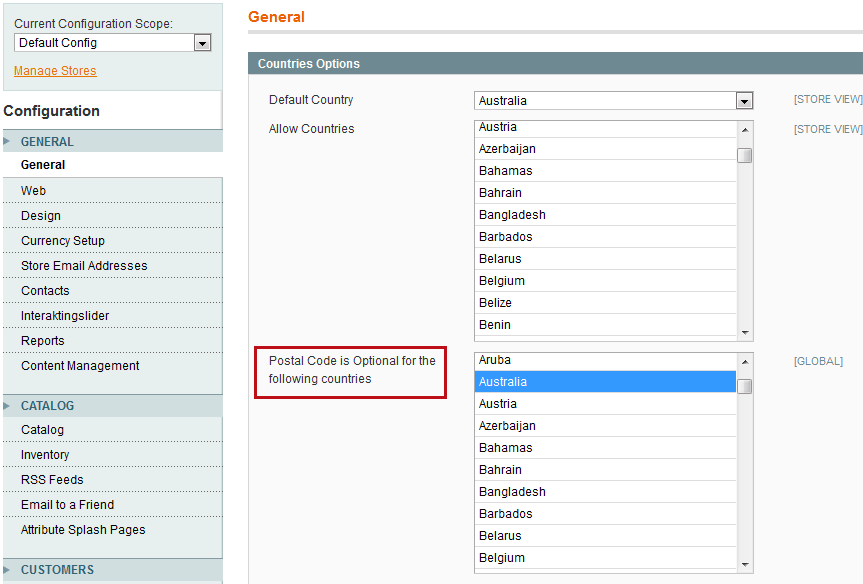
How to remove validation on zip code in magento checkout page

In the World some of the country has no zip code like Ireland, But magento has default zip code validation to make that optional for specific country magento has added a new feature in admin panel. To make Zip code optional please follow the following steps.

Login to your your magento admin panel then go to System -> Configuration->General. From Country option tab you can see there is an option " Postal code is optional for the following countries " Select the country which you want to Optional/Not validate . then click on save config to save your settings. To be more clear on this please see the below screenshot.

7/17/2011

How to change default quantity on Magento Product Page

By default magento shows zero in the place of quantity text field in product details page, if you wish to change then just login to your admin panel go to System->Configuration->Catalog->inventory.

There, add your minimal quantity from Minimum Qty Allowed in Shopping Cart

See the below screenshot to make it more clear

6/16/2011

How to change css padding property using javascript dynamically

Using Javascript we can change css value. Here I have written how to change the value of padding top, padding bottom, padding left, padding right differently. var ab = 20;
//To change Padding-top value write document.getElementById("div_Id").style.paddingTop = ab.toString()+"px" //To change Padding-left value write document.getElementById("div_Id").style.paddingLeft = ab.toString()+"px" //To change Padding-right value write document.getElementById("div_Id").style.paddingRight = ab.toString()+"px" //To change Padding-bottom value write document.getElementById("div_Id").style.paddingBottom = ab.toString()+"px"

5/17/2011

How to send Email in magento

Any body can send mail using php mail() function.But in magento all the functionality has wriiten you need to just send argument inside those functions. See the following code to send mail using magento function

<?php
$mail = Mage::getModel('core/email');
$mail->setToName('Your Name');
$mail->setToEmail('Youe Email');
$mail->setBody('Mail Text / Mail Content');
$mail->setSubject('Mail Subject');
$mail->setFromEmail('Sender Mail Id');
$mail->setFromName("Msg to Show on Subject");
$mail->setType('html');// YOu can use Html or text as Mail format

try {
$mail->send();
Mage::getSingleton('core/session')->addSuccess('Your request has been sent');
$this->_redirect('');
}
catch (Exception $e) {
Mage::getSingleton('core/session')->addError('Unable to send.');
$this->_redirect('');
}
?>