2/21/2011

How to get absolute path of base directory in magento

While uploading a file in magento It's necessary to write the absolute path of your magento path, otherwise it will not upload. you can get your site absolute path from php.ini file, You can place this path by hardcording but later if you think to move your site to another host then the path will be change, So to make your absolute path dynamic or get the proper path in which your magento Installed, write the following code

<?php echo Mage::getBaseDir('media') . DS ;?>

It will definately work,

2/18/2011

How to get access of magento core functions from outside the magento directory

This is the very important thing in magento while accessing data from outside of the magento, You also can use it to set cron job of any magento function, as cron job doen't work properly in magento.


require_once 'app/Mage.php'; // if your are not root folder then write the proper path like publichtml/magento/app/Mage.php
Mage::app('default');

Now you can create object of any classes and can access methods of those classes also.
Like the Below example

$obj = new Mage_Checkout_Model_Observer();
echo $obj->salesQuoteSaveAfter();

2/17/2011

Fix for Magento Admin Login not working on Localhost

When you want to install magento in your local machine by either wamp server or by Xamp server then you will face a problem, while logging into magento admin panel, after successfull install.
Here are the fix to logging into magento.This fix work above Magento version 1.4.1
Go to the location app/code/core/Mage/Core/Model/Session/Abstract/ and open Varien.php then go to line number 86. There you will find the below code. if (!$cookieParams['httponly']) {
unset($cookieParams['httponly']);
if (!$cookieParams['secure']) {
unset($cookieParams['secure']);
if (!$cookieParams['domain']) {
unset($cookieParams['domain']);
}
}
}
if (isset($cookieParams['domain'])) {
$cookieParams['domain'] = $cookie->getDomain();
}

Comment this code, then your code will look like this


/* if (!$cookieParams['httponly']) {
unset($cookieParams['httponly']);
if (!$cookieParams['secure']) {
unset($cookieParams['secure']);
if (!$cookieParams['domain']) {
unset($cookieParams['domain']);
}
}
}

if (isset($cookieParams['domain'])) {
$cookieParams['domain'] = $cookie->getDomain();
}*/

Save the file and Refresh your admin panel page and try to login once again , Now you will be able to login to your Admin Dashboard

2/15/2011

How to configure multiple websites with multiple domain in a single magento

This is One of Magento's best and popular features of magento which allows to run Multiple website with multiple domain name in a single magento.To conigure multiple website or multiple domain Follow the below process.

Create 2 or more website, Store and storeview from System-> Manage Stores

See the below screenshot

Now go to System->Configuration->Web
From Current Configuration Scope: Select your first website i.e website1. Then from Unsecure tab change your Base URL from {{base_url}} to your domain name (e.g http://www.n2ndevelopers.com/)
Do the same for Website2 and website3 by selecting website2 and website3 From Current Configuration Scope:
Below 3 screenshot shows how to do this


Now open your magento Index.php file which you will found in your magento rrot folder. open it and comment the below code

$mageRunCode = isset($_SERVER['MAGE_RUN_CODE']) ? $_SERVER['MAGE_RUN_CODE'] : '';
$mageRunType = isset($_SERVER['MAGE_RUN_TYPE']) ? $_SERVER['MAGE_RUN_TYPE'] : 'store';
Mage::run($mageRunCode, $mageRunType);

And paste the below code

switch($_SERVER['HTTP_HOST']) {
case 'website1.com':
Mage::run('website1', 'website');
/* website1 is the code you wrote in the admin when created the website */
break;
case 'website2.com':
Mage::run('website2', 'website');
break;
case 'website3.com':
Mage::run('website3', 'website');
break;
default:
Mage::run();
break;
}

and Enjoy
How to get all product details or product Id's with respect to individual or each store view in magento

To get all product Id's with respect to each store view, write the below code. $storeId    = Mage::app()->getStore()->getId();
$product    = Mage::getModel('catalog/product');
$products   = $product->getCollection()->addStoreFilter($storeId)->getData();
This will fetch all product details of current store. If u change store it will show different product

1/12/2011

How to generate google sitemap.xml manually in magento

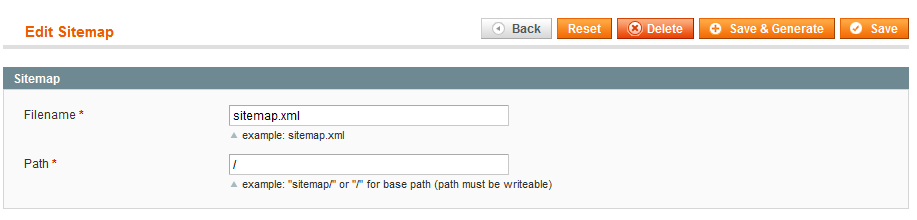
To generate Sitemap.xml in magneto ,Login to your admin panel of your site. Then goto Catalog -> Google Sitemap. Click on Add sitemap then give sitemap.xml in the field of Filename then in the field of Path give your path foldername ( If you wish to save the sitempa.xml in your root folder then use " / " sign). Then click on Save&Generate button to generate your sitemp.xml . then type www.yoursite.com/sitemap.xml to see your sitemap(If you have not use any folder).Submit this sitemap to Google or Bing to see your site in search engines.

1/06/2011

how to remove .html from category and product url in magento

By Default magento's all category url and product url comes with .html extension.If you want to remove the .html extension from all category url and product url, then Follow the below step.

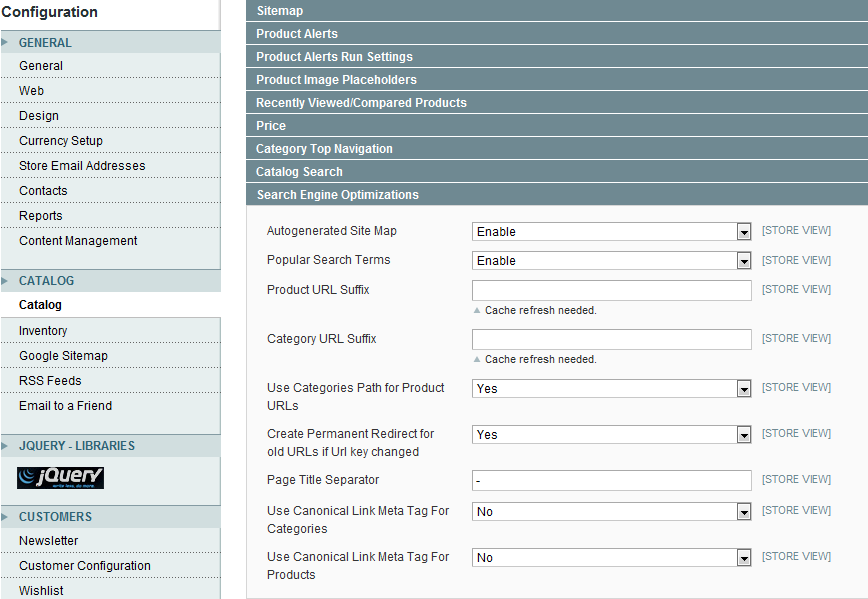
Login to your magento admin panel then Go to System->Config ->Catalog. From Search Engine Optimizations tab delete ".html" from Product URL Suffix and Category URL Suffix, and save config. Now goto System->Index Management and Reindex All data. Now clear your cache. You can see that all .html has been removed.

1/05/2011

How to get sub category list of a particular category in magento

To get all subcategory list under a particular category you need to know the category id of that particular id, then you can get the subcategory .In the below example I have taken My category id is 69.

<?php
$category = Mage::getModel('catalog/category')->getCategories(69);
foreach($category as $_category){
$currentCat = Mage::getModel('catalog/category')->load($_category->getId());
?>
<li><a href="<?php echo $currentCat->getUrl()?>"><?php echo $currentCat->getName();?></a></li>
<?php
}
?>

How to get all Sub-category list by a main category Id in magento

How to see all category and subcategory menu in Magento

By default there is a top.phtml file in magento which show all category and subcategory .To modify menu display style it needs to modify in core file whcih will create problem to Update magento in future,So without touching the core file we can access all category and subcategory in magento.
For that we will write the code in top.phtml file

<?php foreach ($this->getStoreCategories() as $_category): ?>
<li>
<a href="<?php echo $this->getCategoryUrl($_category) ?>"><?php echo $this->htmlEscape($_category->getName()) ?></a>
<?php
$_catid=$_category->getId();
$category = Mage::getModel('catalog/category')->load($_catid);
$subcategory = $category->getAllChildren(true);
array_shift($subcategory);
if($subcategory!=null)
{?>
<ul>
<?php
foreach ($subcategory as $sub)
{
$sub1 = Mage::getModel('catalog/category')->load( $sub);
?>
<li><a href="<?php echo $sub1->getUrl();?>"><span>
<?php echo $sub1->getName(); ?>
</span></a></li>
<?php } ?>

</ul>
<?php }?>

</li>
<?php endforeach ?>

1/03/2011

How to get Current currency code or symbol in magento

To get Current currecy code in magento, write the following code.

<?php echo $current_currency_code = Mage::app()->getStore()->getCurrentCurrencyCode(); ?>

To get Current currecy symbol in magento , write the following code.

<?php echo $current_currency_symbol = Mage::app()->getLocale()->currency(Mage::app()->getStore()->getCurrentCurrencyCode())->getSymbol();?>